ONETALLY MONEY
Clean books for everything you run.
Statements in, sorted books out, and a tax pack at the end. Here is the whole product, in order.
Get startedExample: the same transactions filtered into separate books for Personal, Harbor Design LLC, and Rental: Maple St.
THE DAILY HABIT
Five minutes, then back to your day.
Morning Review walks you through exactly what needs your eyes: new uploads to confirm, flagged transactions, receipts to match. Then it tells you you’re caught up, because you are.
Example: Morning Review walking through three items, one card at a time.
It learns your merchants.
Every line gets a book, a category, and a confidence read. Fix one merchant once and OneTally remembers your call for next time.
Example: a flagged Home Depot charge with a suggested category and the reasoning behind it.
ASK
Ask, and your books answer.
Questions in plain English, answers from your own books. No report builder, no formulas.
Example: pick a question and see the kind of answer the assistant gives from your own books.
Example answer: Software and Subscriptions · Q2 · Harbor Design LLC, -742.35.
Example answers from the staged books. The assistant organizes; it never advises.
Receipts, matched to the money.
Drop in receipts and OneTally pairs them to the right transaction by vendor, date, and amount. Unmatched ones wait in one tidy queue.
Example: a Home Depot receipt paired to its bank transaction by vendor, date, and amount.
The tricky ones, handled.
Transfers
Money moving between your own accounts is not income.
Owner draws
Tracked, and kept out of the P&L.
Paychecks
W-2 deposits recognized as salary, never business revenue.
Refunds
Netted against the original expense.
Splits
One charge, divided across books or categories.
Estimated taxes
Recorded, separated, never deducted twice.
PROJECTS
See the whole job in one view.
Tag the basement renovation across your personal and business money and see the whole job in one place, even when the spending crossed entity lines. Projects are a lens over your books; they never change tax treatment.
Example: a basement renovation project totaled across Personal and Harbor Design LLC spending.
REPORTS
The numbers, already agreed.
Every report reads from the same books and the same rules, so the totals never disagree with each other. Transfers and money you only moved never count as spending.
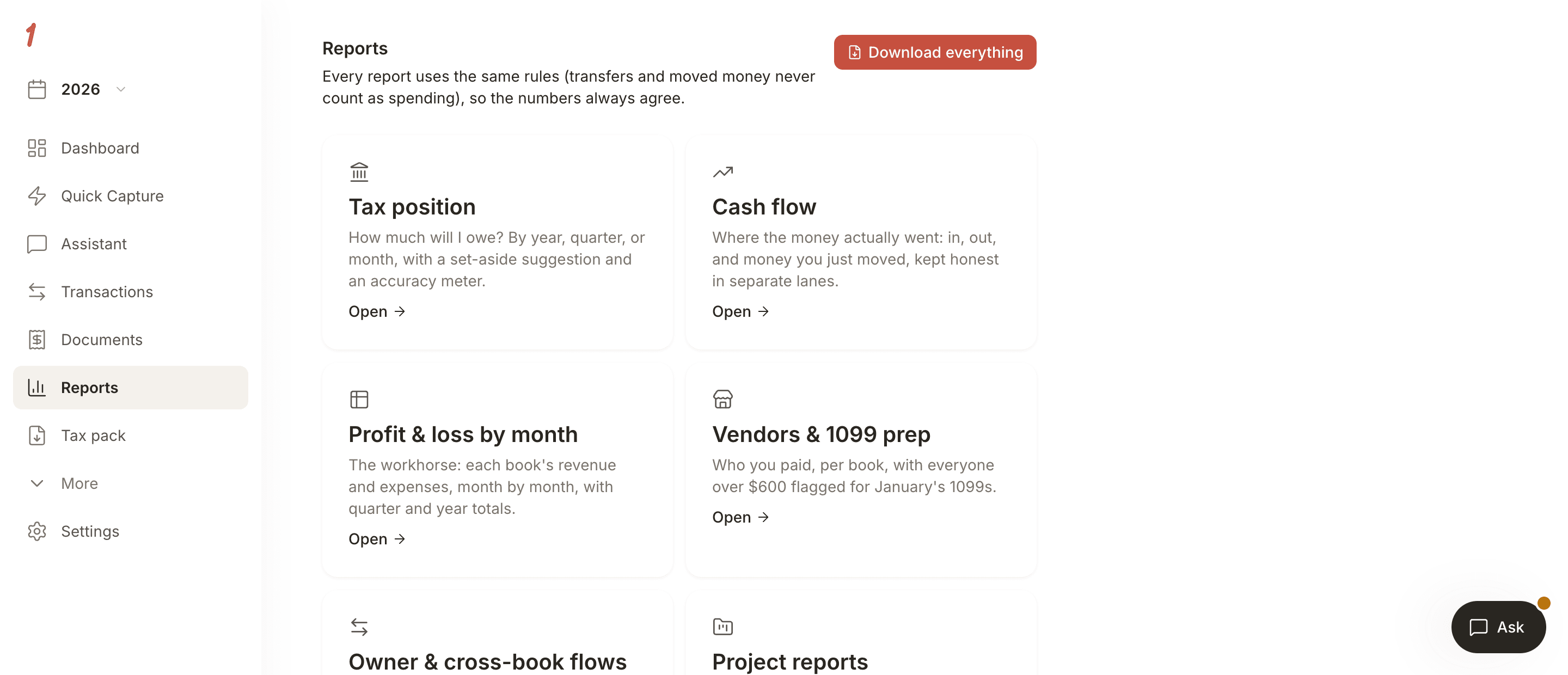
The Reports screen: tax position, cash flow, profit and loss by month, vendors and 1099 prep, owner and cross-book flows, and project reports. Every report uses the same rules, so transfers and moved money never count as spending.
THE TAX PACK
The handoff, done right.
- P&L summary per entity
- Schedule C and Schedule A mapping
- Owner draws and estimated taxes, separated
- Questions for your CPA, gathered
- Full transaction appendix, CSV included
Paying quarterly estimates? Export a pack any quarter, as many times as you need.
Get startedQuestions, answered plainly.
No. OneTally never asks for bank credentials. You upload PDF or CSV statements, and your books build from those.
Any bank that gives you a statement. Parsing is tuned for the major US banks first, and every upload tells you exactly what it found.
No. It organizes everything and produces a pack your CPA or tax software can take from there.
A P&L per entity, schedule-line mappings, separated draws and estimated taxes, flagged questions for your CPA, and the full transaction record with a CSV.
Keeping the current tax year is free, in up to 2 books: upload statements, sort every line, match receipts, no trial clock. You pay for a year when you need its tax pack. A single tax year, brought in and exported, is a one-time $49. Staying current across your years, with the pack included, is $99 a year for up to 3 books.
Tax season, already handled.
Get startedFree for the current year · Tax pack $49 · Stay current $99 a year